Wubble - Introducing 74 New AI Voices in 9 South Asian Languages
- Written by
- Shaad Sufi
- Published
- Reading time
- 10 min read
Why regional-language voiceovers matter
English-only narration may miss people who would rather watch, learn or shop in another language. The opportunity is to make useful content in the language your audience actually chooses.
Choose the language from your audience and campaign brief. For an existing channel, start with viewer geography, language requests and customer conversations. Then test one useful piece of content before translating your entire library.
For teams serving South Asian communities beyond India, make that brief more precise: where the listener lives, which vocabulary feels familiar and whether the message should sound formal, friendly or energetic.
Preferred language for accessing internet content · IAMAI & Kantar, Internet in India 2024, page 13.
74 new voices. Nine more language options in Wubble.
Wubble’s November 2026 voice catalogue update introduces 74 new voices and refreshes 9 existing voices across Marathi, Gujarati, Telugu, Kannada, Malayalam, Bengali, Punjabi, Odia and Urdu.
For creators and teams making regional ads, lessons and product videos, that means more voices to audition for the people you want to reach. Choose your language and narrator, then direct the performance through conversation.
Voice is one part of the result. Wubble also brings music and sound effects into the same audio workflow, so you can shape the narration and the soundtrack around the same project.
- Marathi5 new + 5 updated
- Gujarati10 new
- Telugu10 new
- Kannada10 new
- Malayalam10 new
- Bengali8 new + 2 updated
- Punjabi8 new + 2 updated
- Odia7 new
- Urdu6 new
Wubble catalogue update · 16 November 2026. Updated voices were already in the catalogue.
What will you create with a regional voice?
Start with a message your audience needs to hear. Here are five practical applications, with a focused first project for each.
Regional advertising
A Gujarati retail promotion: introduce the offer, pause before the price and finish with one clear action.
Education & training
An Odia lesson: explain a technical term, give one example and leave time for the learner to follow the instruction.
Product onboarding
A Marathi walkthrough: guide a new user through two steps, keeping button names consistent with the screen.
Creator stories
A Bengali creator video: open conversationally, build emphasis around the reveal and leave space for the picture.
Voice-agent integrations
A support or appointment assistant: connect spoken responses to your application’s conversation flow. Check streaming-language support separately from the new regional catalogue.
Why choose Wubble for regional audio?
When choosing a voice tool, evaluate the full job: finding a narrator, directing the performance, finishing the soundtrack and delivering it where your audience listens. Wubble brings voice creation, conversational direction, music and sound effects into one workspace.
Direct the performance through conversation
Ask for a warmer opening, clearer pauses or a revised line. Keep the script and delivery brief in the same project while you refine the take.
Build the complete soundtrack
Create voiceovers, music and sound effects for the same scene. Keep the music understated under instructions, then shape the ending around your final message.
Choose a voice for your audience
Preview the language and delivery before selecting a narrator. The nine regional language options give teams more voices to audition for local ads, lessons and stories.
Create in the workspace. Integrate through APIs.
Use Wubble’s conversational workspace for content production, or use the documented Speech API to add speech capabilities to your own application.
For your first project, audition two voices with the same short script. Choose the one your audience finds easiest to follow, then build the mix around that performance.
Hear the new regional voices
Tap a voice chip for a quick preview, or explore the players below. Hear one catalogue sample in each of the nine languages, then audition your shortlisted voices with your own script.
9 catalogue previews · Choose a voice, then try your script
Marathi मराठी
5 new · 5 updatedKalyani - Warm Marathi Conversational
Conversational narration. Listen for space between phrases. Try a conversational read before a louder promotional voice.
Gujarati ગુજરાતી
10 newMitali Ben - Upbeat Gujarati Creator
Short social ads. Listen to the energy in the opening. Keep your offer and final action clear when you write your own ad.
Telugu తెలుగు
10 newVijaya - Authentic Telugu Explainer
Product explainers. Listen to how the explanation flows. Test product names and any English interface labels separately.
Kannada ಕನ್ನಡ
10 newAisiri - Warm Kannada Narration
Warm narration. Listen to the sentence endings. For a lesson, leave room for the learner to follow each action.
Malayalam മലയാളം
10 newSamitha - Warm Malayalam Narrator
Stories and explainers. Listen to the pacing across phrases. Check a long sentence in your own script before recording the full piece.
Bengali বাংলা
8 new · 2 updatedSwati S - Pleasant Engaging Creator
Creator videos. Listen to the changes in emphasis. Have a reviewer from your intended audience approve vocabulary and delivery.
Punjabi ਪੰਜਾਬੀ
8 new · 2 updatedJaskirat - Expressive Punjabi Storyteller
Storytelling. Listen to the shifts in expression. Confirm your audience’s preferred script and pronunciation before generating.
Odia ଓଡ଼ିଆ
7 newSwastik M - Clear E-Learning Teacher
Learning content. Listen for clear pauses between ideas. Use a short teaching instruction as your first audition.
Urdu اردو
6 newReva - Warm Urdu Narration
Warm narration. Listen to the flow of the narration. Review names, formal vocabulary and right-to-left captions together.
Same words. Different delivery. Hear the difference.
Compare the first two takes using the same script, then hear three readings of one opening line. The final example keeps that opening and changes the ending.
Illustrative English production examples. Read the transcript as you listen; use the regional previews above to choose a language and voice.
First take
Warm, conversational narration.
A more personal delivery
“Keep the voice. Less presenter, more like talking to a friend.”
One line, three deliveries
Listen in order: relaxed → excited → reflective.
Keep the opening. Change the ending.
The relaxed opening stays; the closing line changes.
Where to find the new voices in Wubble
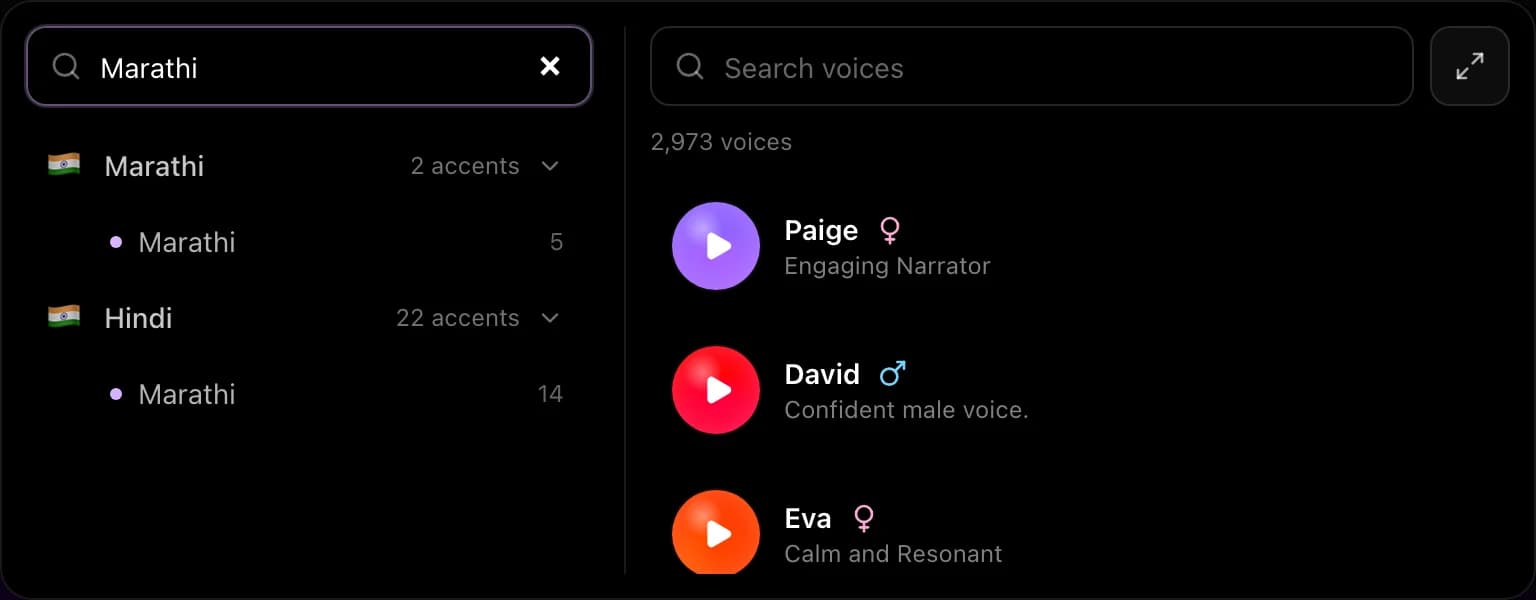
- Open Wubble’s Voice page. Open the voice selector in the prompt box.
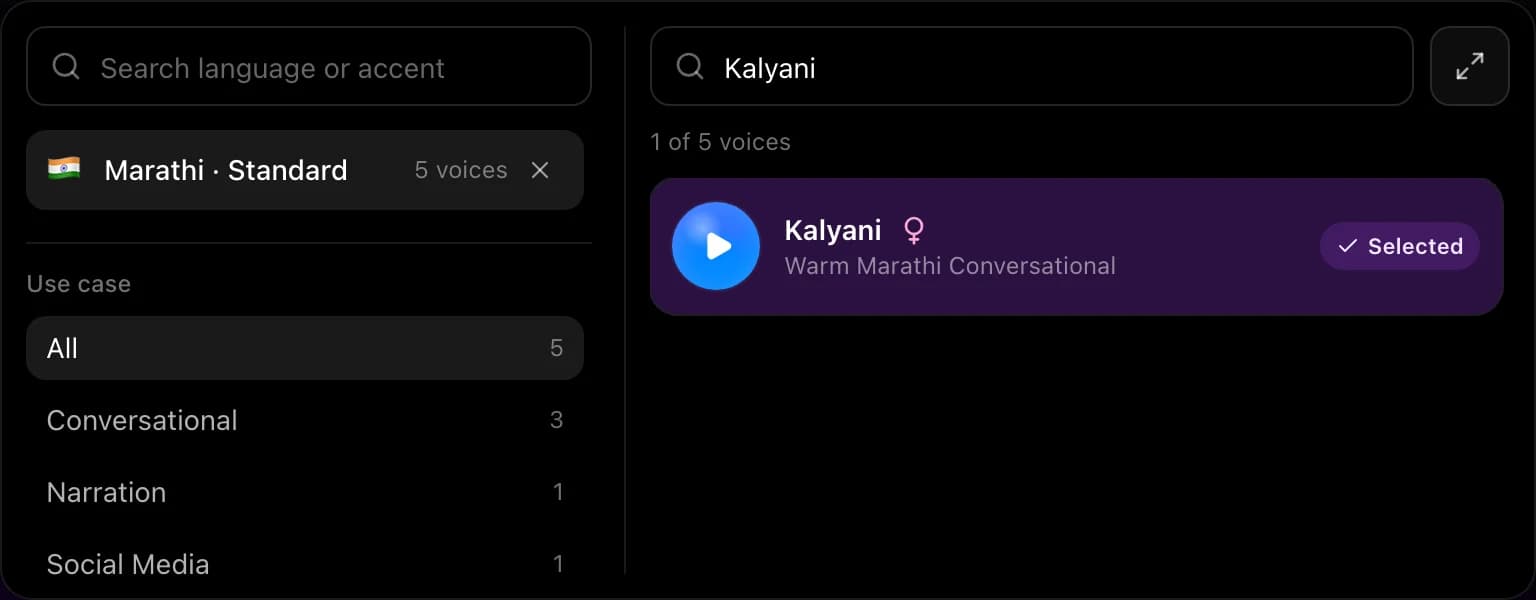
- Search for your language. Choose the language and an available accent grouping. “Standard” is a catalogue label, not a promise of a specific regional dialect.
- Preview and select a voice. Start with the examples above or compare more voices in the picker. Use the selected voice for your first short script.
You can return to the conversation to direct the next take. Keep the selected voice, approved script and delivery brief together so revisions have a clear starting point.
A 30-second script check can save a full retake
Before generating a long piece, collect the words most likely to expose a mismatch: a person’s name, your brand, a place, a price and an English word your audience uses in everyday speech.
- Use an approved target-language script. Ask your reviewer which writing system and level of formality fit the audience. Keep Urdu text and captions right-to-left; confirm the intended script for Punjabi.
- Resolve numbers. “18/11” could be a date, while “1.5” may mean a price, a quantity or a version. Write the intended spoken form when the reading matters.
- Decide how brand names should sound. Compare the original spelling with a reviewer-approved pronunciation spelling. Keep the correct brand spelling in on-screen text.
- Review English words in context. Test a mixed-language sentence as a whole. A voice that handles a word in isolation may phrase it differently in your script.
- Keep one idea per sentence. Check pauses against the picture. If the revised voiceover runs longer, shorten the script or extend the scene.
For a series, save a small pronunciation sheet: the written name, the approved spoken version and the person who checked it. Reuse that brief when preparing the next episode.
Three briefs you can adapt to your own project
Paste your approved script below a clear delivery brief. These are suggested prompts for your own generation.
A Gujarati offer that leaves room for the price
Create a Gujarati voiceover for this short retail ad. Use a friendly, upbeat delivery. Keep the product name clear, pause briefly before the price and make the final action easy to catch. Read only the approved script below.
Revision to try: “Keep the same voice and words. Make the opening less rushed and leave more space before the offer ends.”
An Odia lesson that gives the viewer time to act
Create an Odia narration for this onboarding lesson. Sound like a patient colleague. Separate the two actions with a short pause. Keep the on-screen button name exactly as written in the approved script.
Revision to try: “Keep the introduction. Make the second instruction more deliberate so the learner can find the button.” See our training voiceover guide for matching narration to the screen.
An Urdu explainer with a warmer opening
Create an Urdu voiceover for this product explainer. Begin warmly, then give the instructions with clear, steady pacing. Keep the technical terms as written and avoid making every sentence sound like an announcement.
Revision to try: “Use a more conversational opening. Keep the instructions clear and preserve the product name.” For product demonstrations, plan the narration around what the viewer sees.
Building a voice agent? Choose the right speech path.
A voice agent needs to listen, decide and speak. Wubble’s Speech API supplies speech capabilities; your application manages the conversation, business actions and handoff.
Capture the user’s request and turn speech into text.
Your agent prepares a response and checks any action it needs to take.
Send the response text to Wubble and play the returned audio.
Finished narration or a spoken response?
| Your goal | Speech path | What to check |
|---|---|---|
| Ads, lessons and prepared audio | Generate a complete take and review it before delivery. | Language, pronunciation, timing and your final mix. |
| Start speaking before synthesis finishes | Streaming TTS delivers audio progressively from complete input text. | Supported voice/language, time to audible playback and interruption handling. |
Regional catalogue availability and streaming support are different. The streaming endpoint’s documented language-code list does not include these nine new languages. Check the supported language and voice combination before planning a regional voice agent.
For an appointment assistant, test dates and names. For customer support, test product names and interruptions. Measure from the user finishing their turn to the first audible response; a successful API request alone does not measure the conversation experience.
Read the streaming speech guide · Explore the voice catalogue API
Try the voices in Wubble
Audition the catalogue, try a short script and choose the plan that fits your project. Compare plans and commercial usage.
Create your first regional voiceover
Choose a language and voice, paste your script and direct the delivery in chat.
Build voice into your product
Explore speech endpoints, request formats and integration examples.
Your questions about regional AI voices
The November 2026 catalogue update added Marathi, Gujarati, Telugu, Kannada, Malayalam, Bengali, Punjabi, Odia and Urdu language options. It introduced 74 new voices and updated nine existing voice records. Hindi, Tamil and other catalogue languages remain available. Explore Wubble voices.