How to Choose the Best AI Music Generator in 2026
For videos, ads and branded content, choose Wubble when you need reference-led music, conversational revisions and voiceover or SFX in the same workflow. Hear our real video-to-music example and chat-requested edit, then try it free with your own brief.
- Written by
- Shaad Sufi
- Published
- Reading time
- 12 min read
Choose a music generator that can finish your soundtrack
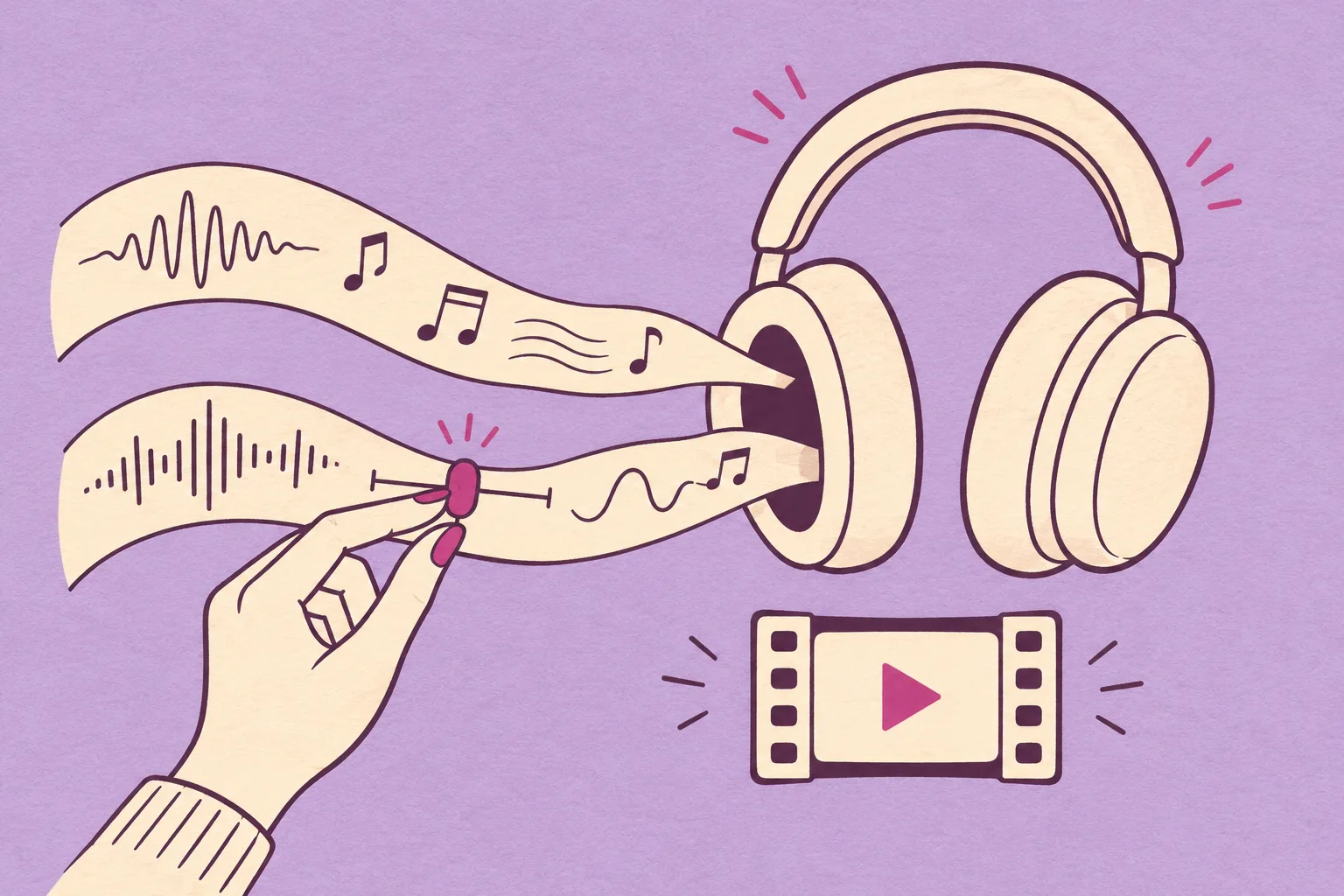
Your video needs more than a good track. It needs music that fits the scene, room for the voice and a finish that lands with the picture. Choose Wubble when you want to create and direct that complete soundtrack in one conversation.
For video creators, marketers and teams making branded content, the advantage is the combination: bring your footage, create original audio, then describe the changes you need.
Four reasons to choose Wubble for your next video
- Conversational
- Direct a revision in plain language.
“Keep the piano. Soften the drums.” - Multimodal
- Start with your video, image or audio reference. Give the music the context of your project.
- All-in-one
- Create music, voiceover and SFX together. Shape how the layers support the same message.
- Royalty-free
- Use your soundtrack under the license included with your plan. Choose coverage for your personal, social or commercial project.
Start with one real project. Try the brief and listening tests below, or open Wubble and bring your own footage.
A real Wubble test: upload, generate, then direct the edit
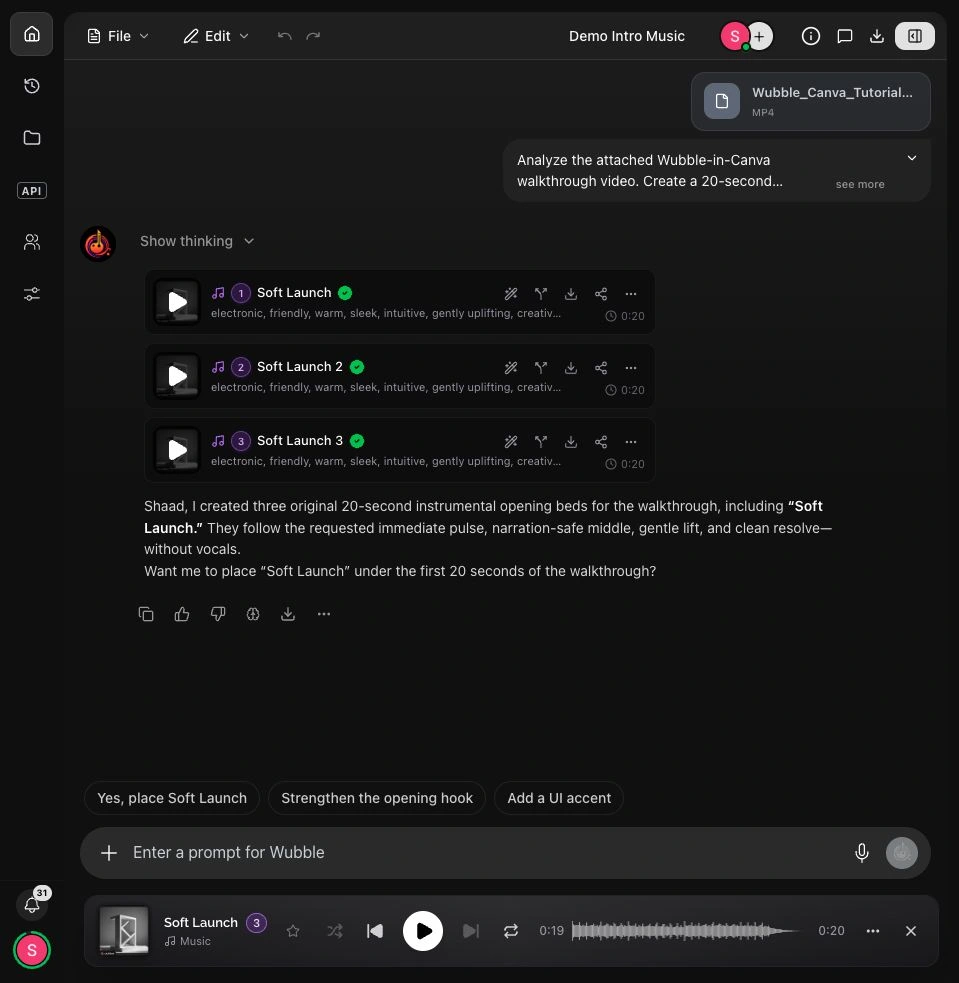
We uploaded our Canva walkthrough video to Wubble and requested a 20-second instrumental for its opening: warm keys, soft bass, restrained percussion and space for narration. Wubble returned three options. We selected Soft Launch.
In the same chat, we asked Wubble to lower the first track while preserving its composition and duration. It placed the original and a quieter copy in the audio editor. The exported comparison measured 6.02 dB lower in the revised version, with the same 20-second timing.
Listen for the change in level, not a new melody. This is a real Wubble volume edit: the arrangement stays the same. Both examples below come from Wubble’s exported timeline.
That is the benefit of directing a specific change: keep the idea you like, then adapt it to the job. Try your own video brief in Wubble.
Wubble · Original soundtrack
Soft Launch · 20 seconds, generated from the uploaded tutorial brief.
Wubble · Quieter revision
The same composition after the chat-requested level edit. Keep your device volume unchanged.
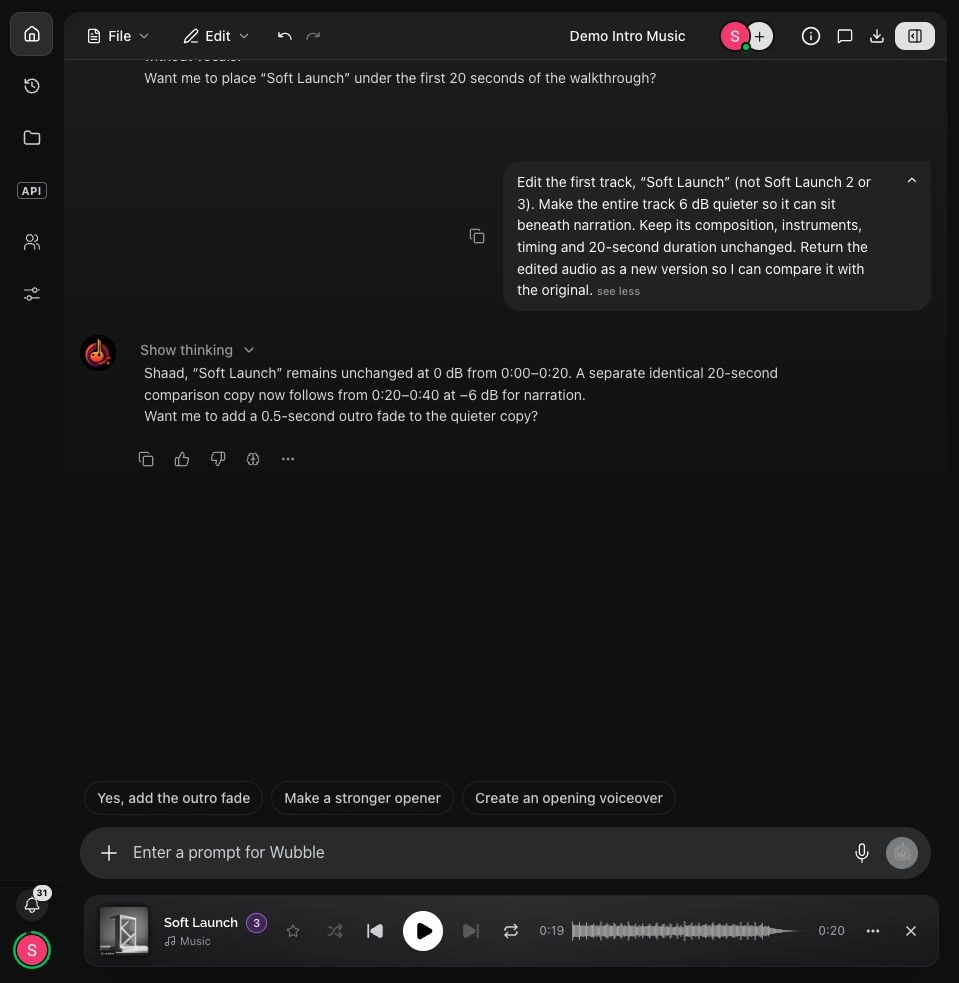
See the video attachment and generated options
What can you try free—and what do you need to publish?
| Your next step | Wubble access |
|---|---|
| Try the workflow | Free · $0 Unlimited generations, conversational editing, music, voice and SFX. Three downloads total, MP3 delivery, personal use. |
| Publish social content | Basic · $4.99/month Eight downloads per month, MP3 delivery and a Social use license. |
| Deliver client or commercial work | Choose the plan and license that cover the project, channels and team. A paid subscription does not automatically mean every commercial use is covered. |
| Need WAV or stems? | Check your plan’s delivery formats and the required export before committing to the final handoff. |
The first draft is faster. Finishing is the real test.
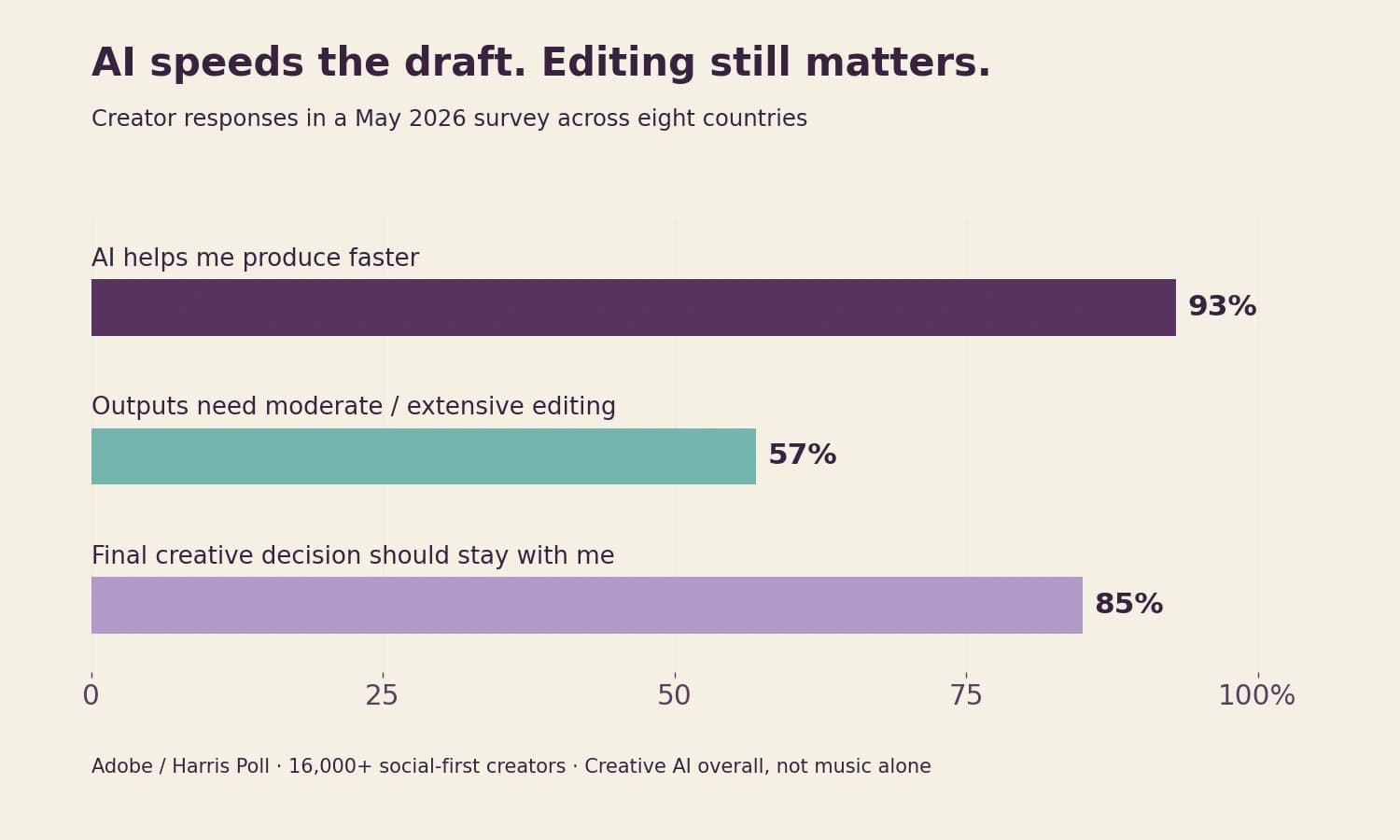
A 2026 Adobe/Harris Poll survey of more than 16,000 social-first creators found that 93% say creative AI helps them produce faster, but 57% say outputs need moderate or extensive editing. And 85% want the final creative decision to remain theirs. The survey covers creative AI broadly, including images, video, audio and design. Read the May 2026 survey findings.
For music, that makes the next question practical: how much control do you have after the first generation? This guide connects industry research with original listening examples, a soundtrack blueprint and a calculator you can use with your own production numbers.
A realistic track can still be the wrong soundtrack
In a 2025 Deezer/Ipsos study, 97% of 9,000 adults failed a three-track AI-versus-human classification task. Participants heard two AI tracks and one human-made track. That result describes this specific listening task; it does not establish that every AI output fits a professional brief. Study and methodology.
For a creator, “does it sound real?” is only the opening question. A convincing recording can still compete with speech or miss the edit. The examples below isolate one of those problems.
These illustrative mixes use the original music and voice prepared for Wubble’s tutorial. The composition and narration are identical; only the music level changes. Play both at the same device volume. Which lets you follow the words more easily?
Mix A · Voice forward
Same source music and narration, with the music lower. Follow the complete sentence.
Mix B · Music forward
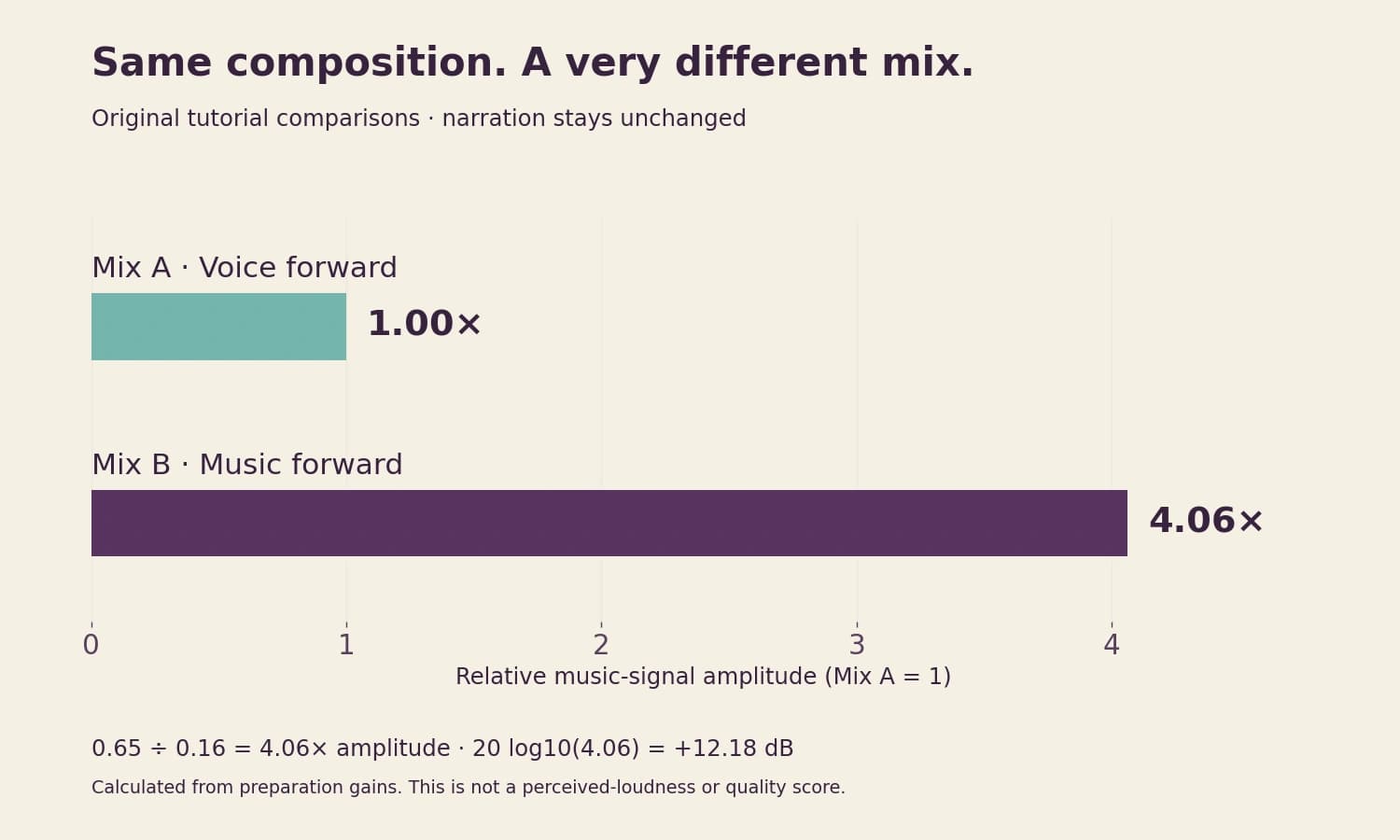
The music is about 12 dB higher relative to the same voice. Which words take more effort?
Read the spoken words
“Your next soundtrack starts with a conversation. With Wubble, create and edit music just by chatting. Describe the vibe. Make it yours.” The next sentence begins at the end of the excerpt.
The hidden variable: mix decisions can outweigh a new generation
In our prepared example, the music multiplier changes from 0.16 to 0.65, while the narration and common output gain stay fixed. That is 4.06× the music-signal amplitude, or +12.18 dB. It is a signal-level change, not a claim that the music sounds four times louder.
This distinction can save an unnecessary creative restart. If a passage works musically but the message is hard to hear, reduce the music first. If a lead instrument still distracts even at a lower level, change the arrangement during the spoken passage. If the emotional direction is wrong, then revise the composition.
Choose the smallest edit that solves the problem. A generator with useful mix and section controls gives you more options than repeatedly asking for a completely new song. Listen to the voice-forward and music-forward mixes before changing your prompt: you may already have the right music.
Choose for the job the music has to do
| Your project | What matters most | First test |
|---|---|---|
| Video or podcast | Music leaves room for the voice. | Play it beneath real narration. |
| Song or sung hook | Clear lyrics and expressive phrasing. | Listen to each line, then request one revision. |
| Game or ambient loop | A smooth repeat that stays comfortable. | Loop it three times; listen at each join. |
| Ad or client campaign | A strong opening, clean ending and suitable rights. | Try the full edit and a shorter cut. |
Working inside Canva? Use our Canva music walkthrough to create and insert the soundtrack directly.
For a brand, recognizable can matter more than endlessly new
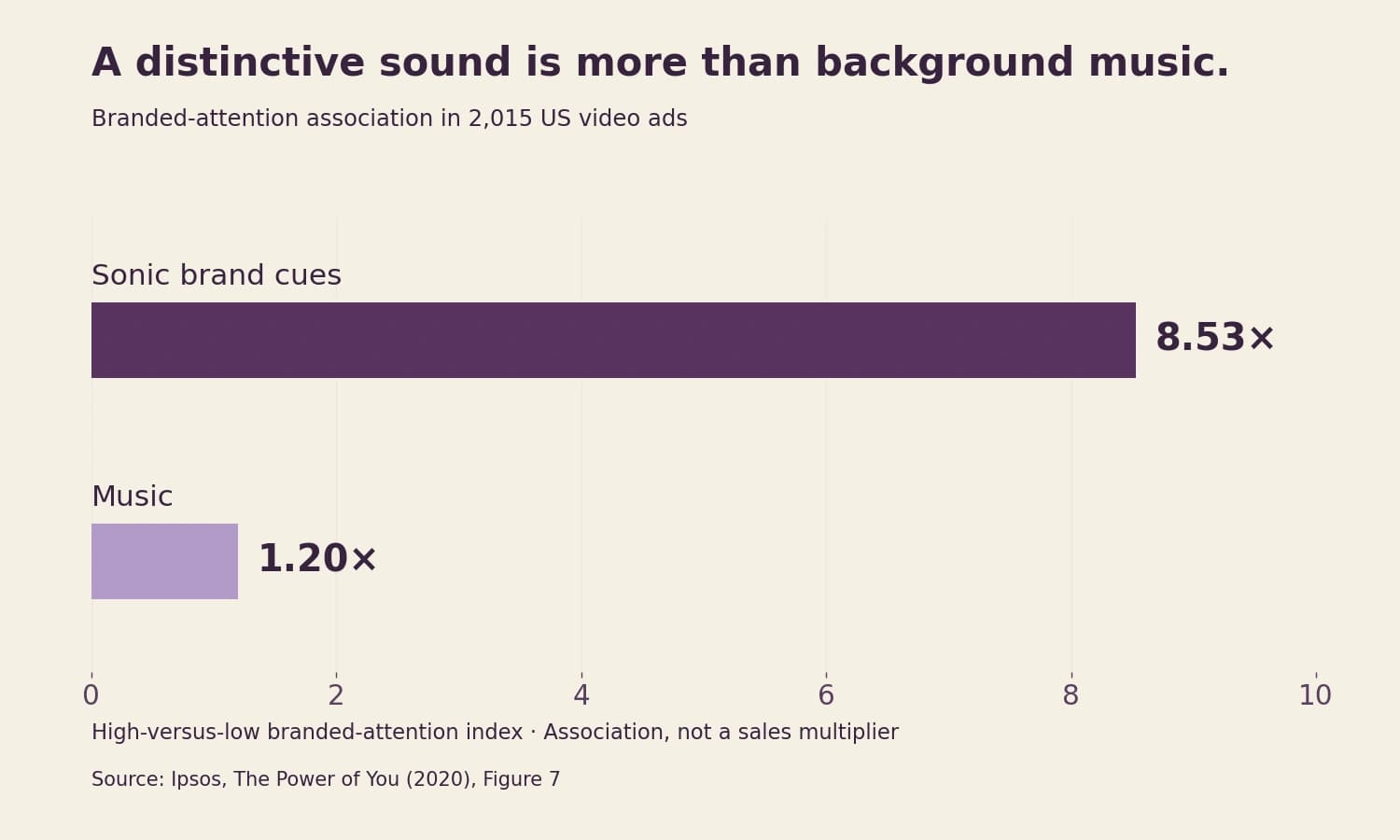
Ipsos examined 2,015 US video ads for its 2020 report The Power of You. Its high-versus-low branded-attention index was 8.53 for sonic brand cues and 1.20 for music. This is an association in that dataset, not an eightfold sales promise or a test of AI music. Ipsos, Figure 7.
The useful distinction is between background music and a sound that becomes associated with your brand. A new track for every post can create variety while losing continuity.
For your next campaign, write down three things to preserve: a short melodic idea, an instrument palette and an energy range. Then ask for a shorter cut or a calmer variation while retaining those anchors. Audition the versions together: would they plausibly belong to the same campaign?
This is where conversational revision becomes valuable. You can state what must stay alongside what should change, rather than describing each new track from scratch. For a sung brand cue, explore the jingle guide.
Test one real brief from beginning to end
A genre describes the sound. A production brief describes what that sound has to accomplish. “Upbeat electronic music” leaves the generator to guess when the product appears, when someone speaks and what the final frame needs.
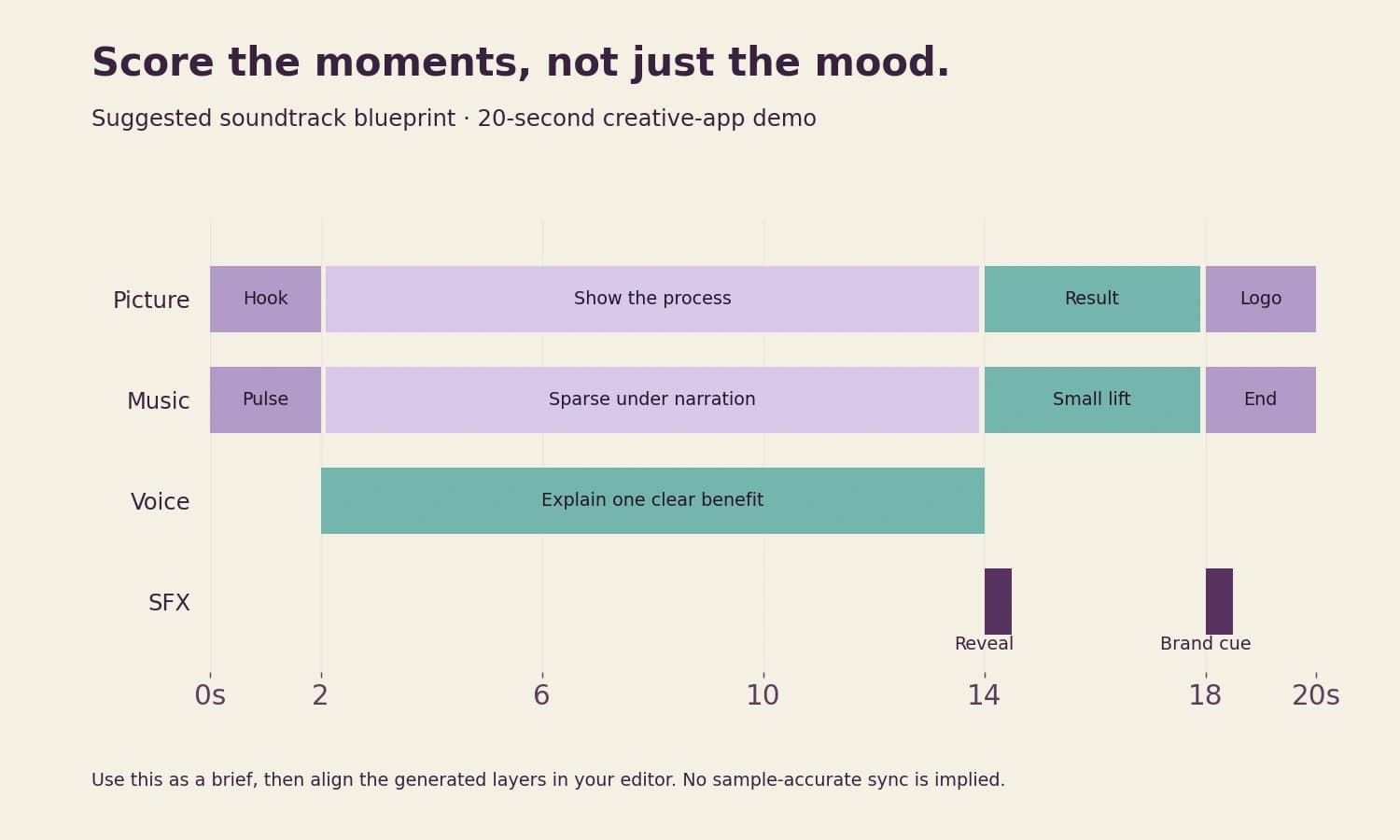
For this example, imagine a 20-second creative-app demo: a quick opening, a narrated explanation, a finished-design reveal and a closing logo. Give the generator the duration, those moments and a small set of musical choices. Upload the footage when you have it so the visual context accompanies the words.
The prompt below is a starting brief you can try in Wubble. The key instruction is the space for narration from 2–14 seconds: it tells the music what role to play, rather than asking for a mood alone.
Example music prompt: Create 20 seconds of instrumental music for a friendly creative-app demo. Light rhythmic keys, warm bass and crisp but restrained percussion. Start with a clear pulse, leave room for narration from 2 to 14 seconds, then give the closing title a small lift and a complete ending. No vocals or long intro.
Turn your brief into a soundtrack blueprint
Before generating more options, map the moments that carry the message. In this suggested example, the music introduces a pulse, becomes sparse beneath the explanation and lifts for the reveal. A short effect marks the visual event; the voice carries one clear benefit.
That division of labour makes revision easier. If the reveal feels flat, change that moment. If narration feels crowded, adjust the middle. You can describe those decisions in the same conversation without rewriting the entire creative brief.
A useful prompt for the next pass: “Keep the opening pulse. Reduce the lead melody while the voice speaks from 2 to 14 seconds. Build gently into the reveal, then finish cleanly on the logo.”
After generation, align the actual layers in your editor and listen through the joins. The blueprint is a creative target; the exported audio is what you judge. See the media-to-music workflow for starting with video, image or audio references.
Five tests worth doing before you commit
| Check | Listen for | What to try |
|---|---|---|
| Scene fit | The opening matches what happens on screen. | Ask for an immediate start or a slower build. |
| Clear speech | Every word remains easy to follow. | Lower the music first; simplify busy instruments if needed. |
| Clean sound | No distracting clicks, unstable notes or abrupt transitions. | Listen on headphones and a phone, including the ending. |
| Useful revisions | The requested change works without losing the parts you liked. | Keep the earlier version and compare one change at a time. |
| Ready delivery | The duration and file work in your editor. | Import the export; audition any stems you need. |
Music too loud is a mix problem. Music too busy may need a different arrangement. The voice-forward and music-forward mixes help you hear the first before changing the second.
Use a four-part revision brief: keep, change, avoid, check
“Make it better” gives you little to evaluate. A useful revision specifies what you already approve and the one remaining problem. Try this four-part brief on the same project:
First compare the changed section, then play the complete track. This catches a common trade-off: an edit that fixes the middle but weakens the transition into the ending. Keep the earlier version until the new one works in context.
For a campaign cutdown, change the task rather than only the duration: “Make a six-second version that introduces the same musical idea immediately and resolves on the logo.” A shorter export of a long intro may never reach the part that made the original useful.
For a loop, ask for a stable texture and audition the join several times. For a sung hook, check the actual words and phrasing. The review target should follow the deliverable, rather than treating every generated track as a finished song.
The last second can decide whether a track is usable
These two six-second excerpts use the same recording. One stops at the edit point; the other has a 1.5-second fade. Listen to the last moment and picture your closing title.
A fade softens the cut. If the musical phrase still feels unfinished, ask for a complete ending or choose a better edit point.
Ending A · Hard cut
Six seconds of the original recording, stopped at the edit point.
Ending B · Short fade
The identical segment, with a 1.5-second fade. Listen through the final moment.
The overlooked price: your time per finished soundtrack
A low subscription price can coexist with a slow production process. Every version takes time to hear, compare and place against the picture. A small editing inconvenience repeated across eight or twenty deliverables can matter more than the headline monthly fee.
Use the calculator below to separate tool spend from the value of your production time. With its illustrative starting inputs, a $20 monthly tool spread over eight finished tracks contributes $2.50 per track. Reviewing three versions for 1.5 minutes each and spending ten minutes on editing/export adds about $9.67 of time at $40/hour.
That totals about $12.17 per finished track. It is a worked scenario, not a market average or a Wubble savings claim. Change the inputs to your own workflow. If an easier revision reduces your editing time, the calculator shows what that change would be worth.
When evaluating Wubble, track the number of versions you audition and the time needed for a usable finish. Unlimited generation gives you room to explore; the productive goal is a soundtrack you can approve, not a larger pile of alternatives.
What does one finished soundtrack cost you?
These starting values are illustrative, not Wubble prices or measured production times. Replace them with your own.
1.9 hours and $97.33 per month at your inputs.
Would you use it in the project today?
Review your chosen track against these five checks. Start with the first unchecked item and use it to decide your next edit.
Choosing AI music: frequently asked questions
Start with your project: musical fit, clear speech, useful revisions, export options and the rights you need. Try one real brief from creation to final delivery. Wubble lets you explore music, voiceover and sound effects together through chat.